People don’t book a venue on impulse. They compare capacity, look at every photo, check dates, read the rules about vendors and food, and only then ask for a tour. An event venue website that answers those questions clearly gets the tour request — the one that doesn’t gets skipped, even if the space is beautiful. This guide covers the pages and details that turn venue browsers into booked events.
Short answer: show the space with many real photos, state capacity and layouts, publish packages or starting prices, explain what’s included and the rules, and make “check availability” or “book a tour” the main button on every page.
In this guide
- How people choose a venue
- Pages every event venue website needs
- Showing the space
- Packages, pricing and what’s included
- Availability and tour booking
- Rules, vendors and policies
- Content that keeps the calendar full
- Local SEO for venues
- A real example
- FAQ
How people choose a venue
Every event starts with a short list of hard requirements: the date, the number of guests and the budget. Only venues that pass those filters get a closer look at style and atmosphere. Your website should help visitors check the hard requirements in seconds — then win them over with photos and details.
- Capacity — seated and standing, for each room or layout.
- Location — city, neighborhood, parking and distance from nearby towns.
- Price range — even a “from” price filters out mismatched inquiries.
- Event types — weddings, birthdays, baby showers, corporate events, intimate dinners.
Pages every event venue website needs
- Home — hero photo or video of the space set for an event, capacity, location and “Check availability”.
- The space — rooms, layouts, floor plan and a large photo gallery.
- Packages & pricing — hourly rental, all-inclusive packages, weekday and weekend rates.
- Events — a page or section for each main event type.
- Gallery — real events held at the venue.
- FAQ & policies — vendors, catering, alcohol, decorations, setup time, deposits.
- Book a tour / contact — form, calendar, map, phone.
Showing the space
Photos sell venues. Invest in them:
- Shoot the empty room in daylight to show the architecture.
- Shoot the room dressed for real events in different styles.
- Include details clients care about: entrance, restrooms, bridal room, bar, stage, parking.
- Add a floor plan with dimensions and suggested layouts — planners love it.
- Use a short video walkthrough or 360° tour if you can.
Packages, pricing and what’s included
Clear packages reduce back-and-forth emails and help clients imagine the event.
| Package | Typical contents | Show on the site |
|---|---|---|
| Venue only | Space for a set number of hours, tables and chairs | Hourly or flat price, minimum hours |
| Standard | Venue, basic décor, setup and cleanup | Price, guest limit, hours |
| All-inclusive | Venue, décor, lighting, coordinator, preferred vendors | “From” price and what’s included |
| Add-ons | Photo booth, DJ, extra hours, catering | Prices per add-on |
If pricing depends on the date, show a range and explain what changes it — weekday vs weekend, season, holidays.
Availability and tour booking
- A “Check availability” form with date, event type and guest count as the first fields.
- Tour booking with time slots, so interested clients can visit without phone tag.
- A “now booking through 2027” style note creates urgency for popular dates.
- Instant notifications to your phone, so you reply within minutes.
- An option to pay a deposit online to hold a date once the client decides.
Rules, vendors and policies
Many inquiries end in disappointment because rules were unclear. Publish them:
- Outside catering and alcohol rules.
- Preferred or required vendors.
- Setup and teardown times included in the rental.
- Decoration limits (open flames, confetti, wall fixing).
- Deposit, payment schedule, cancellation and damage policy.
- Noise limits and end time.
A clear FAQ also gives AI assistants exact facts to quote when someone asks “venues for 80 guests near me that allow outside catering”.
Content that keeps the calendar full
Weekends sell themselves; weekdays and off-season dates need help. Your event venue website can fill them:
- Weekday and off-season offers with their own page and lower starting prices.
- Event idea pages — “baby shower ideas for 40 guests”, “small wedding reception in [city]” — that answer what planners search for and show your space in action.
- Real event recaps with photos, guest count and a short description of the setup.
- Corporate pages for meetings, workshops and holiday parties, which often book weekdays.
- A simple email signup for open-date announcements and last-minute offers.
Each of these pages gives Google and AI assistants another reason to recommend your venue for a specific kind of event.
Local SEO for venues
- Put the city and venue type in titles: “Event Venue in New Port Richey, FL”.
- Mention nearby towns you serve guests from.
- Create pages for each event type: “baby shower venue”, “intimate wedding venue”, “birthday party venue”.
- Keep your Google Business Profile full of fresh event photos and matching contact details.
- Ask clients to mention the event type in reviews.
The basics are in our local SEO guide.
A real example
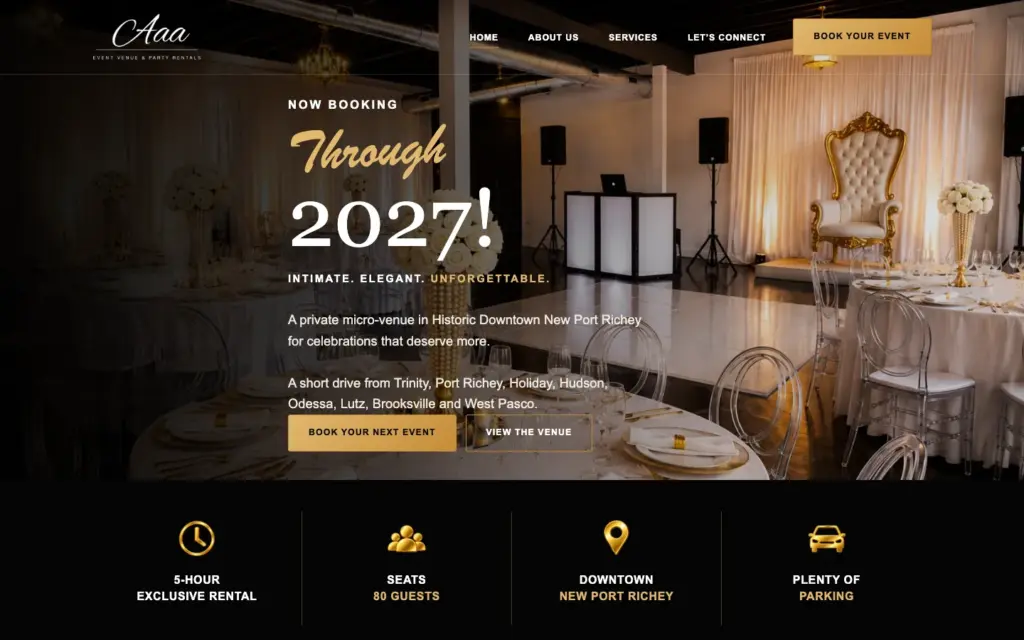
For AAA Event Venue & Party Rentals, a private micro-venue in historic downtown New Port Richey, Florida, we built a site that leads with a warm photo of the dressed room and the headline “Now booking through 2027”. Right under it, four facts answer the first questions — 5-hour exclusive rental, 80 seated guests, downtown location, plenty of parking — and “Book your next event” is always one tap away. It shows how a small venue can look premium and convert well. If you also rent décor, read our event rental website guide.
Launch your event venue website
Since 2018, Eve Site Design has built more than 2,600 websites, including venues and event businesses. Choose a ready-made design or a custom build and we’ll set up your gallery, packages and tour booking in 3–5 business days. Compare costs and timelines on our options page.
Frequently asked questions
What should an event venue website include?
Capacity and layouts, lots of real photos, packages or starting prices, event types, rules and policies, an availability form and tour booking.
Should a venue publish prices?
At least starting prices or ranges. They filter out mismatched inquiries and make serious clients more likely to request a tour.
Can clients book a tour online?
Yes. A scheduling tool can show tour time slots on your site, and clients pick one without calling.
Can I take deposits on my venue website?
Yes. Online payments through Stripe or Square let clients pay a deposit to hold their date.
How long does it take to build a venue website?
With photos and package details ready, about 3–5 business days at Eve Site Design.