Party and event rental businesses live on quote requests. A couple planning a wedding, a mom organizing a sweet sixteen or a company booking a gala will browse several rental companies in one evening — and send a request to the ones that make it easy. A well-built event rental website shows your inventory, proves your styling skills and turns visitors into quote requests while you’re busy setting up the next event.
Short answer: organize your rentals into a clear catalog with photos, show real styled events, state your service area and minimums, and make a short quote form available from every page. Update it as your inventory grows so new items never push old ones off the site.
In this guide
- How clients choose a rental company
- Pages an event rental website needs
- Building a rental catalog
- The quote request form
- Gallery and social proof
- Local SEO for event rentals
- A real example
- Common mistakes
- FAQ
How clients choose a rental company
Event clients are planning something emotional with a fixed date. They want to know three things quickly: do you have the style and items they imagine, do you deliver to their venue, and roughly what it will cost. Rental businesses that answer those questions online get the request; those that say “DM for info” usually don’t.
Your website also has to look like your events. If you sell luxury décor, a cheap-looking site makes clients doubt the quality of your chairs and linens.
Pages an event rental website needs
- Home — your style in one image, the events you serve, your area and a “Request a quote” button.
- Rentals — the catalog: chairs, tables, linens, backdrops, centerpieces, lighting, tents, thrones and lounge furniture.
- Services — event styling, full décor packages, balloon garlands, setup and teardown.
- Gallery — real events you styled.
- Rental terms — delivery fees, minimums, deposits, damage and cancellation policy.
- About — your story and team.
- Quote / contact — the form, phone, email and service area map.
Building a rental catalog
The catalog is the heart of an event rental website. It should be easy to browse and easy for you to update.
- Categories that match how planners think: seating, tables, linens, décor, backdrops, lighting, kids’ party items.
- One clear photo per item on a plain background, plus a styled photo if you have one.
- Item details: size, color options, quantity available and price per day or per event.
- “Add to quote” button so clients can collect items and send one request.
- Easy editing: you should be able to add a new backdrop or chair style in minutes, without a developer.
Whether to show prices depends on your business. Many rental companies show item prices and quote delivery and setup separately — that alone filters out unrealistic requests.
The quote request form
A good quote form is short but collects everything you need to reply in one message:
| Field | Why it matters |
|---|---|
| Event date | Check availability immediately |
| Event type and guest count | Estimate quantities |
| Venue or city | Delivery fee and service area |
| Items or package of interest | Prepare the quote |
| Budget range | Suggest the right package |
| Inspiration photos | Understand the style |
| Preferred contact method | Reply where the client actually answers |
Send yourself an instant notification for every request — by email or even to your phone — because the first company to reply often wins the event.
Gallery and social proof
- Show complete event setups, not only single items — clients buy the vision.
- Label galleries by event type: weddings, baby showers, birthdays, corporate.
- Add client reviews and venue names you’ve worked with.
- Link your Instagram, but keep the best photos on your own site where Google can see them.
- Add short event stories — “a 120-guest garden wedding in gold and ivory” — that show what you can create and give search engines real text to index.
Local SEO for event rentals
- List your service areas by city and county; consider a short page for each main area.
- Use phrases clients search: “party rentals in [city]”, “chair and table rentals”, “wedding décor rentals”.
- Keep your Google Business Profile complete with photos and the same contact details as your site.
- Write helpful content — “how many tables for 100 guests” style FAQs are exactly what Google snippets and AI assistants like to quote.
Our local SEO basics guide applies to event businesses too.
A real example
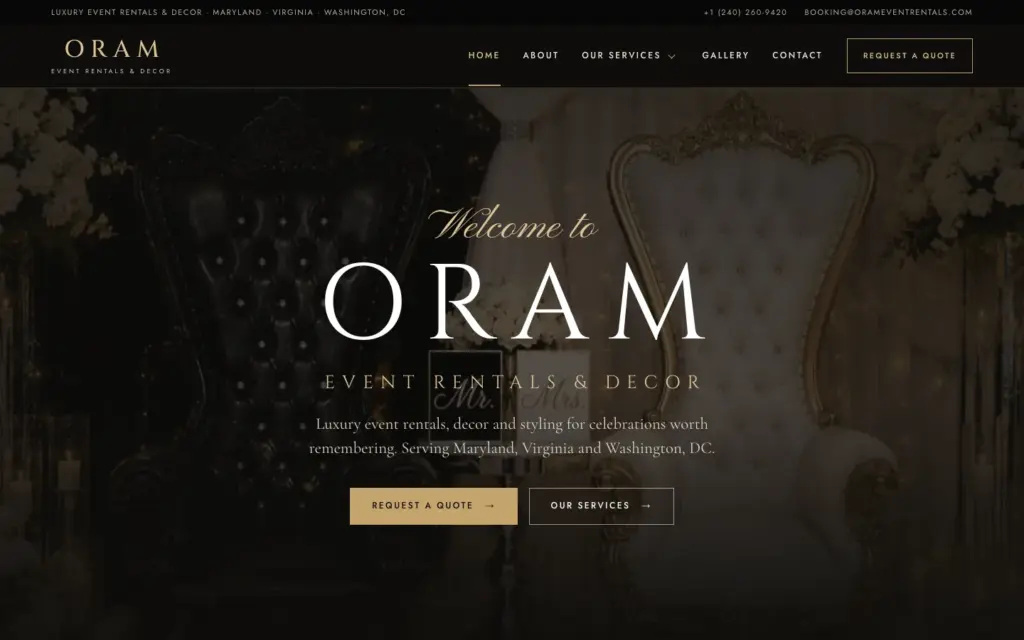
For Oram Event Rentals & Decor we rebuilt the website in an elegant black-and-gold style and made every homepage section editable from one settings screen, so new services no longer push older ones off the page. A gallery managed in the admin and an online quote form complete the setup. Read the full Oram Event Rentals case study, or see other event and venue sites in our portfolio.
Common mistakes
- Catalog as a PDF. Hard to read on a phone and invisible to Google.
- No service area. You get requests you can’t serve and miss local searches.
- Long quote forms. Ten required fields lose half the requests.
- Outdated inventory. Clients ask for items you sold years ago.
- Slow replies. Make sure requests reach your phone instantly.
Get your event rental website
Eve Site Design has built more than 2,600 websites since 2018, including event rental, décor and venue businesses. Pick a ready-made design or a custom build, and we’ll set up your catalog, gallery and quote form in 3–5 business days. Compare your options on our comparison page.
Frequently asked questions
What should an event rental website include?
A rental catalog with photos, services, a gallery of real events, rental terms, service area and a short quote request form.
Should I show rental prices online?
Showing item prices builds trust and filters requests. Many companies list item prices and quote delivery and setup separately.
Can clients add items to a quote online?
Yes. A catalog can include “add to quote” buttons so clients collect items and send one request with their event details.
Which platform is best for an event rental business?
WordPress is flexible for catalogs and quote forms; Shopify suits companies that want full online checkout with deposits.
How long does it take to launch?
With your inventory photos and prices ready, about 3–5 business days at Eve Site Design.