A great cut gets you a loyal client. A great barber shop website gets you the first visit. When someone moves to your area or their usual barber is fully booked, they search “barber near me”, compare two or three shops on their phone and book the one that looks sharp and makes booking easy. This guide shows what a barber website needs to win that moment — whether you hire someone for barber website design or set it up yourself.
Short answer: a barber shop website should show your best cuts, list services with prices and times, let clients book a chair online in under a minute, and make your location, hours and phone number impossible to miss on mobile. Everything else is a bonus.
In this guide
- Why a barber needs a website, not just Instagram
- Pages every barber shop website needs
- Online booking that fills the chair
- How to show prices
- A portfolio of cuts that sells
- Getting found locally on Google
- A real example
- Common mistakes
- FAQ
Why a barber needs a website, not just Instagram
Instagram is perfect for showing fresh fades, but it is a poor place to make a decision. Prices are buried in highlights, the address is in a bio link, and booking means sending a DM and waiting. A website puts all of that on one page that works for people who have never heard of you.
- Google shows websites, not posts. When someone searches “barber shop in [your city]” or “skin fade near me”, Google ranks websites and Google Business Profiles. Instagram posts rarely appear.
- You own it. An algorithm change can’t hide your website from your clients.
- Booking runs while you cut. Clients book themselves at 11 pm instead of messaging you between clients.
- AI assistants read it. Tools like ChatGPT and Google’s AI answers pull facts — services, prices, location, hours — from websites. A clear site makes it more likely your shop gets mentioned.
Pages every barber shop website needs
A barber website can be small. Five pages cover almost everything clients look for:
- Home. One strong photo or short video, your shop name, neighborhood and a “Book now” button above the fold.
- Services & prices. Haircuts, fades, beard trims, hot towel shaves, kids’ cuts, line-ups — each with price and duration.
- Barbers. A photo and short intro for each barber with a direct booking link. Many clients choose the person, not the shop.
- Gallery. Your best work, grouped by style.
- Contact & location. Address with a map, parking tips, hours, phone and a click-to-call button.
Optional but useful: a shop page for pomades and beard oils (see our men’s grooming store design), gift cards, a membership plan for regulars, and a short “about the shop” story.
Online booking that fills the chair
Online booking is the single feature that turns a barber website into a revenue tool. Clients expect to see open slots and book instantly — the same way they order food.
- Booking in three taps. Service → barber → time. Don’t force account creation before the time is picked.
- Book button everywhere. In the header, after services, on each barber’s profile and in a sticky bar on mobile.
- Deposits for long services. A small deposit for premium cuts or late-evening slots cuts no-shows dramatically.
- Reminders. Automatic text or email reminders 24 hours before the appointment.
- Walk-ins. If you take walk-ins, say so clearly, and show your walk-in hours.
If you still take bookings through DMs, our guide on moving from Instagram DMs to a booking website shows how to switch without losing clients. Popular booking tools for barbers include Square Appointments, Booksy, Vagaro and Fresha. Any of them can be connected to a website — the key is that the button on your site opens booking directly, not a generic homepage.
How to show prices
Hiding prices loses clients. People compare shops, and “DM for prices” sends them to the shop that answers the question right away.
| Service | What to show |
|---|---|
| Haircut / fade | Starting price, duration, what’s included (wash, line-up, styling) |
| Beard trim / shape-up | Price, add-on price when combined with a cut |
| Hot towel shave | Price and duration |
| Kids’ cut | Age limit and price |
| House calls / events | “From” price and a request form |
If prices differ by barber, show a range (“from $35”) and the exact price inside the booking tool.
A portfolio of cuts that sells
Your gallery is your sales pitch. A few rules make it work much harder:
- Quality over quantity. 20 sharp, well-lit photos beat 200 random ones.
- Show the range. Fades, tapers, textured crops, designs, beard work, kids’ cuts.
- Name the styles. Captions like “drop fade with beard line-up” help clients ask for what they want — and help Google understand your page.
- Use consistent light and background. One corner of the shop with good light makes every cut look premium.
- Link to Instagram for the daily feed, but keep the best work on your own site.
Getting found locally on Google
Most barber clients come from within a few miles. Local SEO is how you show up for them:
- Put your city and neighborhood in the page title and main heading, e.g. “Barber Shop in Arlington, TX”.
- Use the same name, address and phone number on your website and your Google Business Profile.
- Add a map and directions on the contact page.
- Write service descriptions in plain words clients search: “skin fade”, “beard trim”, “kids haircut”.
- Ask happy clients for Google reviews and link to them from the site.
- Make sure the site loads fast on a phone — most searches for barbers happen on mobile.
Our local SEO basics guide walks through each step.
A real example
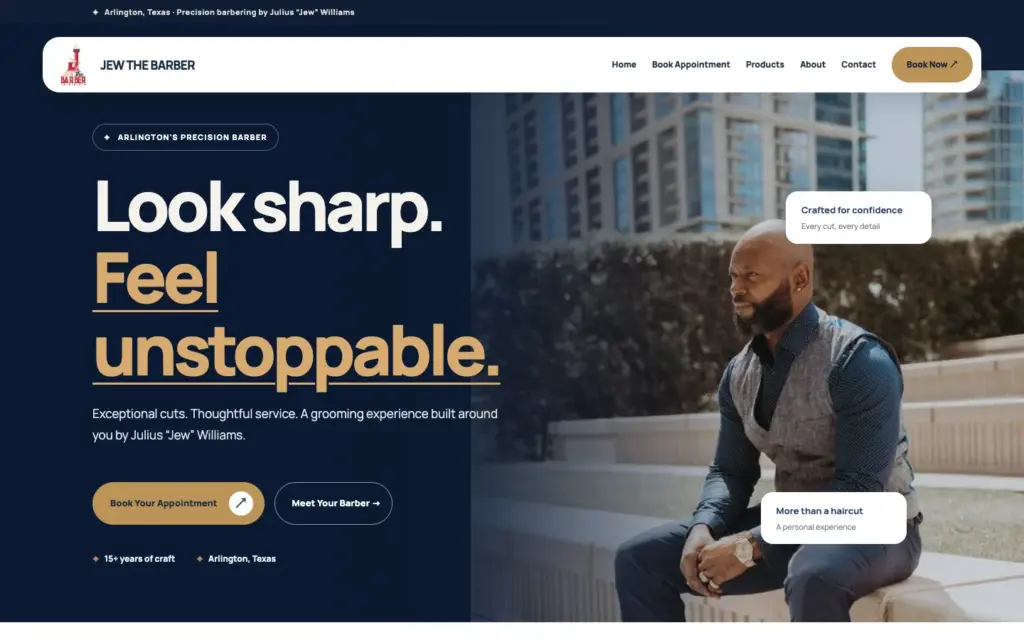
For Jew the Barber in Arlington, Texas we built a site with a bold hero photo, a clear “Book Your Appointment” button, services with prices and a short story about the barber behind the chair. The layout puts booking one tap away on every screen and keeps the city in the headline, so both clients and Google know exactly where the shop is. You can see this and dozens of other live sites in our portfolio.
Common mistakes
- No prices. The fastest way to lose a comparison shopper.
- Booking hidden in the menu. It should be the most visible button on the page.
- Old hours. Nothing frustrates a client more than a closed door during “open” hours.
- Blurry photos. They make great cuts look average.
- Only a link-in-bio page. It can’t rank on Google and looks temporary.
Get your barber shop online
Eve Site Design has built more than 2,600 websites since 2018, including sites for barbers, salons and beauty pros. Pick a ready-made design or ask for a custom one, fill in a 5-minute questionnaire and your barber shop website can be live in 3–5 business days, with booking connected. Not sure which route fits? Compare doing it yourself, hiring a freelancer or an agency.
Frequently asked questions
How much does a barber shop website cost?
A professional barber website with booking costs from about $67 for a ready-made design set up with your brand to $299 for a fully custom build at Eve Site Design. Agencies usually charge several thousand dollars.
Which platform is best for a barber website?
Wix and WordPress work well for service-only shops with booking; Shopify is the better choice if you also sell grooming products online.
Can I connect Booksy or Square to my website?
Yes. Your website’s “Book now” buttons can open your Booksy, Square Appointments, Vagaro or Fresha booking page directly.
Should every barber in the shop have a profile?
Yes. Clients often choose a specific barber, so a photo, specialties and a direct booking link for each barber increases bookings.
How do I get my barber shop on the first page of Google?
Use your city in titles and headings, keep your name, address and phone identical on your site and Google Business Profile, collect Google reviews and make the site fast on mobile.