Clients hand their tax preparer some of the most sensitive information they have: income, Social Security numbers, bank details. Before they do, they look you up online. Smart tax preparation website design makes your practice look established and secure, explains your services and fees, and lets clients book an appointment or upload documents without endless phone calls — especially in the busy season.
Short answer: show credentials (PTIN, EA or CPA status), list services and starting fees, explain the process step by step, offer secure document upload and online appointments, and keep your location and contact details visible on every page.
In this guide
- Why trust comes first
- Pages a tax preparer website needs
- Services and fees
- Explaining the process
- Secure documents and online appointments
- Tax preparation website design: look and tone
- Year-round services for the off-season
- Local SEO for tax preparers
- A real example
- FAQ
Why trust comes first
Most people choose a tax preparer by referral or by searching “tax preparer near me” — and then judge the website. A dated or sloppy site raises a simple worry: if they can’t keep their website in order, will they keep my return in order? A clean, professional website with clear credentials and policies removes that doubt instantly.
Trust also covers privacy. Clients want to know how their documents are handled, who sees them and how they’re stored.
Pages a tax preparer website needs
- Home — who you serve, your credentials, location and “Book an appointment”.
- Services — individual returns, self-employed and small business, bookkeeping, payroll, amended returns, IRS notices, ITIN applications, tax planning.
- Fees — starting prices or how fees are calculated.
- How it works — the steps from first contact to filed return.
- About — experience, credentials, languages spoken.
- Client portal / upload — secure document submission.
- Contact — office address, hours (including seasonal hours), phone, map.
Services and fees
Many preparers hide fees, and many clients leave because of it. Publishing starting prices filters out bargain hunters and attracts clients who value expertise.
| Service | How to present the fee |
|---|---|
| Individual return (simple) | “From $X” with what’s included |
| Self-employed / 1099 | “From $X”, plus per-schedule pricing |
| Small business return | Range by entity type |
| Bookkeeping / payroll | Monthly packages |
| IRS letters and amendments | Flat fee or consultation |
If you offer refund transfer or pay-from-refund options, explain them clearly and honestly, including any extra costs.
Explaining the process
New clients feel calmer when they know what will happen:
- Book an appointment (in person, phone or video).
- Receive a checklist of documents to bring or upload.
- Upload documents securely or bring them to the office.
- Review the prepared return together.
- Sign and e-file; receive copies for your records.
A downloadable tax document checklist is one of the most useful pages you can publish — clients bookmark it, share it, and search engines and AI assistants reference it.
Secure documents and online appointments
- Never ask clients to email tax documents. Link to a secure client portal or encrypted upload tool instead.
- Explain your security in plain words: encryption, limited access, how long files are kept.
- Online appointments with time slots, including virtual consultations.
- Automatic reminders about appointments and missing documents.
- Seasonal banners — “Now booking for tax season” — with key deadlines.
Tax preparation website design: look and tone
The design should say “organized, reliable, modern”. Classic combinations — navy, black and gold, deep green and white — signal stability. Use real photos of your office and team, clean typography, and short, plain-language explanations. Avoid jargon walls; most clients just want to know you’ll handle it correctly and on time.
Bilingual pages are a strong advantage in many communities; if you serve Spanish-speaking clients, a Spanish version can bring in more appointments than any ad.
You can start from a tax preparation studio website design or an accounting firm design in our catalog.
Year-round services for the off-season
Tax season is short; your rent isn’t. A website helps sell services that keep income steady the rest of the year:
- Bookkeeping and payroll packages for small businesses, with monthly pricing.
- Tax planning sessions in the fall to reduce next year’s bill.
- Business formation help — LLC setup, EIN, first-year guidance.
- IRS notice and audit support, which clients need any month of the year.
- Quarterly estimated tax reminders for self-employed clients.
Give each one its own page or section with a booking button. Off-season pages also add helpful content that keeps your site visible in search all year, not only from January to April.
Local SEO for tax preparers
- Use your city in titles: “Tax Preparation Services in [City]”.
- Create pages for key services people search: “self-employed tax preparation”, “ITIN application help”, “IRS letter help”.
- Keep your Google Business Profile updated with seasonal hours.
- Collect reviews after every tax season.
- Publish clear answers to common questions; they’re what Google snippets and AI tools quote.
See our local SEO basics for the full setup — the steps are the same for any local business.
A real example
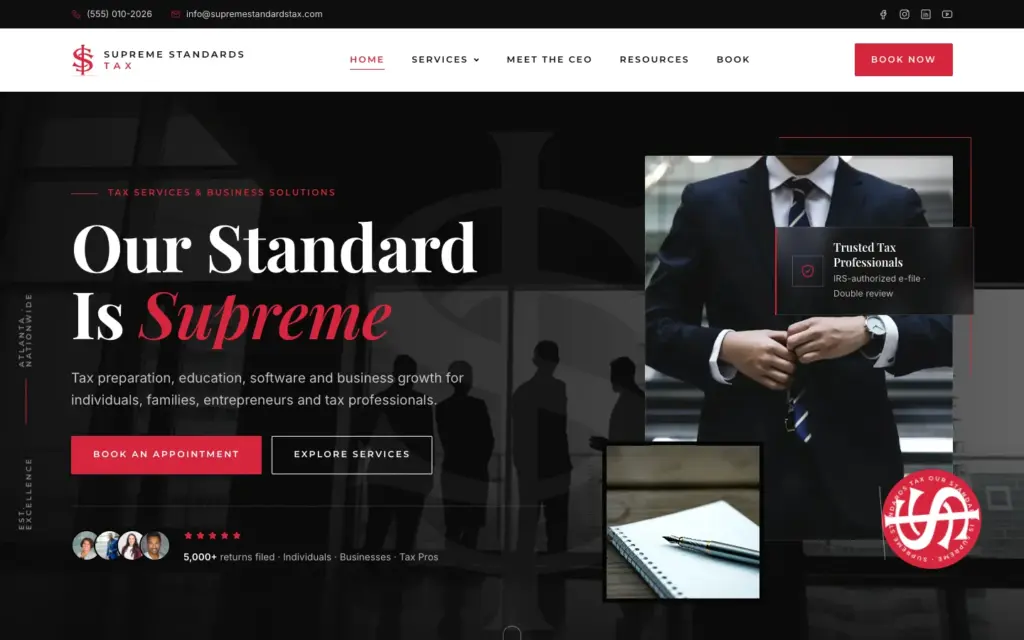
For Supreme Standards Tax we designed a site around the line “Our Standard Is Supreme.” A confident black, white and red palette, a professional hero photo and clear calls to action for appointments make the practice look established from the first second, while services are laid out so clients find what they need fast.
Get your tax preparation website
Since 2018, Eve Site Design has built more than 2,600 websites for small businesses. Choose a ready-made design or a custom build and we’ll set up your services, fees and appointment booking in 3–5 business days — ideally well before tax season starts. Compare your options on our comparison page.
Frequently asked questions
What should a tax preparer website include?
Services and starting fees, credentials, the step-by-step process, secure document upload, online appointments, seasonal hours and contact details.
Is it safe to collect tax documents through a website?
Only through a secure client portal or encrypted upload tool. Never use plain email or a basic contact form for tax documents.
Should tax preparers publish their fees?
Publishing starting fees builds trust and filters inquiries. Complex returns can still be quoted after a consultation.
When should I launch my tax preparation website?
Ideally two to three months before tax season, so the site has time to appear in local searches before clients start looking.
How much does tax preparation website design cost?
At Eve Site Design, from $67 for a ready-made design to $299 for a fully custom website, as a one-time price.