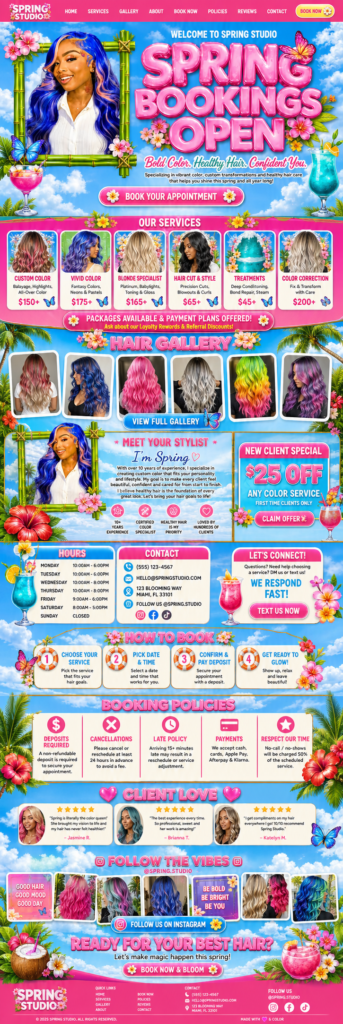
A hair salon website has one job: fill your calendar. Clients want to see your work, know the price and book a time without a back-and-forth in DMs. This guide covers what to include on a salon or stylist website so new clients book and regulars rebook — whether you’re a solo stylist in a suite or a salon with a team.
In this guide
- The homepage
- Services and prices
- Booking and deposits
- Gallery
- Stylists and team
- Policies
- Location and local search
- Extras that pay off
- Mistakes that keep salon calendars empty
- Turning first visits into regular clients
- Quick salon website checklist
- FAQ
The homepage
Lead with your best work and a Book your appointment button. Under it, a short line about what you specialize in — color, silk press, braids, cuts, extensions — so the right clients know they’re in the right place. Keep the most important actions (book, call, find us) visible on mobile, where most salon traffic comes from.
Services and prices
A clear service menu is the single biggest booking driver. For each service show the price (or “from” price), the time it takes and a one-line description. Group services into categories: cuts and styling, color, treatments, extensions, braids. If prices depend on hair length or density, say so plainly. Clients prefer a “from $120” with an explanation over no price at all.
Offer packages where it makes sense — cut + gloss, install + style — and mention payment plans if you accept Klarna or Afterpay for bigger services like color corrections.
Booking and deposits
Online booking should take under a minute: pick a service, pick a stylist (if you have a team), pick a time, pay a deposit. Deposits protect your time and cut no-shows. Make the booking button sticky in the header so it’s always reachable. A short “How to book” section with 3–4 steps helps first-time clients who aren’t sure what to do.
Gallery
Show your best recent work, grouped by category: blonding, vivid color, silk press, cuts, braids. Before-and-after photos are especially convincing. Update the gallery every few months so it reflects your current style — it’s often the page clients look at right before booking.
Stylists and team
Clients book people. For a solo stylist, a warm “Meet your stylist” block with your photo, experience and specialties works great. For a salon, give each stylist a short profile with their specialties and a direct booking link.
Policies
Put deposits, cancellations, late arrivals, guests and color-correction consultations on one clear page and link it from booking. Friendly, firm policies reduce awkward conversations and no-shows.
Location and local search
Show your address, a map, parking information and opening hours. Use your city and neighborhood naturally on the homepage and services page (“silk press in Atlanta, Midtown”). Link your site from your Google Business Profile and ask happy clients for Google reviews — together these help you appear in “hair salon near me” searches. More in How to get your beauty business found on Google.
Extras that pay off
- New client offer — a small discount on the first color service.
- Gift cards — easy extra income, especially around holidays.
- Retail — the products you use and recommend.
- Reviews near the booking button.
- Instagram feed to show you’re active.
Mistakes that keep salon calendars empty
- No online booking — clients who want to book at night move on.
- Prices hidden behind “consultation required” for every service — use “from” prices instead.
- A gallery that hasn’t changed in a year — it makes the salon look quiet.
- Booking flows with too many steps — every extra screen loses clients on mobile.
- No reminders — automatic text or email reminders cut no-shows noticeably.
- Policies only shared after booking — clients should agree to them before they confirm.
Turning first visits into regular clients
A full calendar comes from regulars, not just new clients. Your website can help:
- Rebook prompts. In the confirmation and thank-you emails, suggest when to come back: “Root touch-up in 6–8 weeks — book now”.
- Memberships or packages. Monthly blowouts or treatment bundles bring steady income.
- Referral offers. A small reward for clients who bring a friend.
- Retail. Let clients reorder the products you used at home.
- Email list. A short monthly note with open slots and seasonal offers fills quiet weeks.
Measure what matters
Once a month, check how many bookings came through the site, which services are booked most and where visitors drop off. If many visitors view prices but few book, the booking step is too complicated. If few people see the prices at all, make the services link more visible. Small changes based on real numbers fill more chairs than a redesign.
Quick salon website checklist
- Book now button visible on every page, including mobile.
- Service menu with prices, times and short descriptions.
- Deposits and automatic reminders switched on.
- Gallery updated in the last three months.
- Policies linked from the booking page.
- Address, map, parking and hours on the contact page and footer.
- Google Business Profile linked to the site.
- Gift cards available, especially before the holidays.
Tick these off and your website will quietly do the job of a front desk — answering questions, taking bookings and collecting deposits while you focus on clients in the chair.
Salon designs with booking built in
- Hair Salon Booking — vivid tropical salon page with services, prices, gallery and booking policies
- Pink Hair Booking Studio — “Book now, slay later” layout for stylists and wig installers
- Pastel Wig Shop — install services with prices plus a wig shop
Browse all designs or read how it works — most salon sites are live in 3–5 business days.
Frequently asked questions
Which booking system is best for a salon?
On Wix, the built-in Wix Bookings is simple and reliable. On Shopify and WordPress, use a dedicated booking app or plugin that supports deposits and staff calendars.
Should I show prices on my salon website?
Yes — at least “from” prices. Clients compare salons before booking and often skip the ones without prices.
How do I stop no-shows?
Take a deposit at booking, send automatic reminders and make your cancellation policy clear before the client confirms.
Can I sell products on my salon site?
Yes. A small shop with the products you use in the salon is easy to add and brings extra income.