Opening an online boutique is exciting — and full of small decisions that decide whether shoppers buy or bounce. This clothing boutique website checklist walks through everything to set up before launch, in the order that makes sense. Tick it off and you’ll open with a store that looks professional and sells from day one.
In this guide
- Brand basics
- Collections and navigation
- Product pages
- Photos
- Size guide and fit
- Shipping, returns and payments
- Launch and marketing
- Pages every boutique needs
- The first 90 days after launch
- Keep the store fast
- FAQ
1. Brand basics
- Logo in two versions: full and a small square icon.
- Two or three brand colors and one or two fonts — use them everywhere.
- A one-line description of your style: “Soft, feminine pieces for everyday confidence”.
- Domain name that matches your Instagram handle if possible.
2. Collections and navigation
Shoppers browse by category and by occasion. Set up both:
- By type: tops, dresses, sets, bottoms, outerwear, accessories.
- By moment: new arrivals, best sellers, sale, vacation, going out.
Keep the main menu to five or six items. On the homepage, show collection tiles with photos so mobile shoppers can tap straight in. A New arrivals banner keeps the store feeling fresh.
3. Product pages
Every product page should include:
- A clear name and price, with sale price if relevant.
- Size and color options as variants, with sold-out sizes marked.
- Fabric, stretch, length and care in short bullet points.
- Model’s height and the size she’s wearing.
- Shipping time and return rule right under the Add to cart button.
- “Complete the look” suggestions to raise order value.
4. Photos
Photos sell clothes. Shoot every product on a model plus a flat or hanger shot, with a consistent background and light. Show the back, a detail close-up and, if possible, a short video of movement. Keep image sizes consistent so collection pages look tidy.
5. Size guide and fit
Most returns are about fit. A size chart in inches, a “how to measure” note and fit comments (“runs small — size up”) reduce returns and questions. Link the size guide on every product page, not only in the footer.
6. Shipping, returns and payments
- Shipping rates and a free-shipping threshold, shown in the top bar.
- Processing time (“ships in 1–3 business days”).
- A clear return or exchange policy in plain language.
- Payment options: cards, Apple Pay, Google Pay and pay-later (Klarna, Afterpay, Shop Pay).
- Test a real order end to end before launch.
7. Launch and marketing
- Email signup with a small first-order discount.
- Instagram feed or “shop the look” section.
- Google Search Console and a sitemap submitted.
- Abandoned-cart emails switched on.
- A launch post and story countdown on social media — a “coming soon” page can collect emails before you open.
Common mistakes new boutiques make
- Launching with too many products and weak photos instead of fewer products with great photos.
- Hiding shipping costs until checkout.
- No size guide, which leads to returns.
- A cluttered homepage with too many banners and pop-ups.
Pages every boutique needs
- Home — hero, new arrivals, collections, best sellers, reviews, email signup.
- Collection pages — filters by size, color and price; sorting by newest and best selling.
- Product pages — as in the checklist above.
- Size guide — one page, linked from every product.
- About — your story and what makes your style different.
- Shipping and returns — rates, timing, how exchanges work.
- Contact and FAQ — answers to order, sizing and payment questions.
- Lookbook (optional) — styled outfits that link to each piece.
The first 90 days after launch
A boutique grows through regular drops and returning customers. A simple rhythm for the first three months:
- Weekly: post new pieces on Instagram and TikTok linking to the product; check sizes running low.
- Every two to four weeks: a small new arrivals drop announced by email and in stories.
- Monthly: review best sellers and slow movers; move slow items to a sale collection; ask recent buyers for reviews.
- After 90 days: look at which traffic sources buy (Instagram, TikTok, Google, email) and focus your time there.
Keep your homepage current with each drop — a “New arrivals” banner that’s three months old makes the store look abandoned.
Email is your best friend
An email list costs nothing to grow from day one and usually brings the most repeat sales. Offer a small first-order discount, send drops and restocks, and keep messages short with good photos. Even a few hundred subscribers can sell out a small drop.
Keep the store fast
Fashion stores are photo-heavy, and slow pages lose shoppers, especially on mobile. Compress photos before uploading, use the same image proportions for all products, limit apps to the ones you really use and avoid auto-playing videos on the homepage. Test your store on a phone with mobile data every time you add a new feature. A fast, simple store almost always sells more than a slow, flashy one.
Make the first order easy
First-time buyers hesitate the most. Help them with a visible size guide, clear shipping costs before checkout, pay-later options, real customer photos and an easy way to ask a question — a contact link or chat. Remove every small doubt and the first order comes much more easily; after that, email and new drops bring them back.
Boutique designs ready to launch
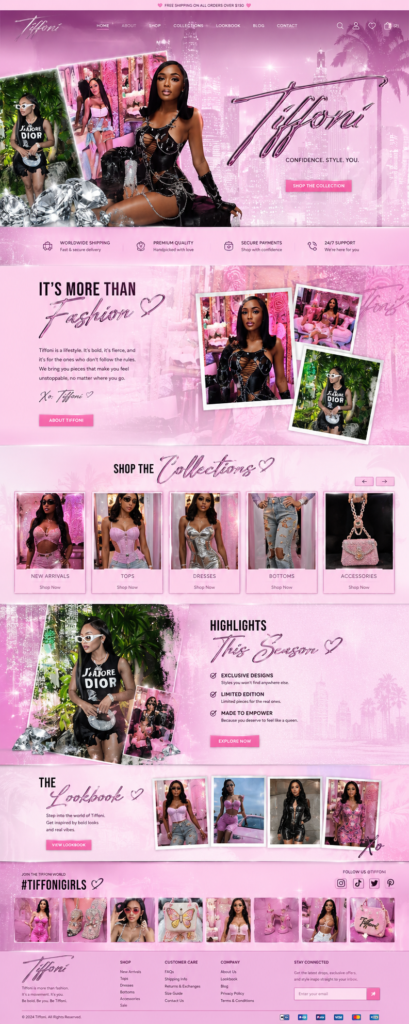
- Pink Fashion Boutique — glam store with collections slider, lookbook and hashtag wall
- Luxe Neutral Boutique — calm beige store with dresses, new arrivals and accessories
- Trend Collection Boutique — warm cocoa store for satin and evening wear
Browse more boutique designs or see packages — your store can be live in 3–5 business days.
Frequently asked questions
What’s the best platform for an online boutique?
Shopify is the strongest choice for most boutiques: sizes, colors, inventory and a trusted checkout are built in.
How many products should I launch with?
Twenty to forty well-photographed products is plenty. Add new drops regularly to give people a reason to come back.
Do I need my own photoshoot?
Strongly recommended. Supplier photos appear on many stores; your own photos make your boutique look unique and trustworthy.
Should I offer free shipping?
Offer it above a threshold that’s a bit higher than your average order — it encourages shoppers to add one more item.